chatgpt.com/images · Batch download · CSV metadata
Download every ChatGPT image into one folder—no more right-click saves
Prompt builders, designers, and researchers all hit the same wall: a growing gallery and no sane way to archive it. ChatGPT Image Downloader works on the live Images page so you can move from grid to a dated local folder or CSV without a save marathon.
Built for creative workflows, asset libraries, and structured research—without pretending one-by-one downloads scale.
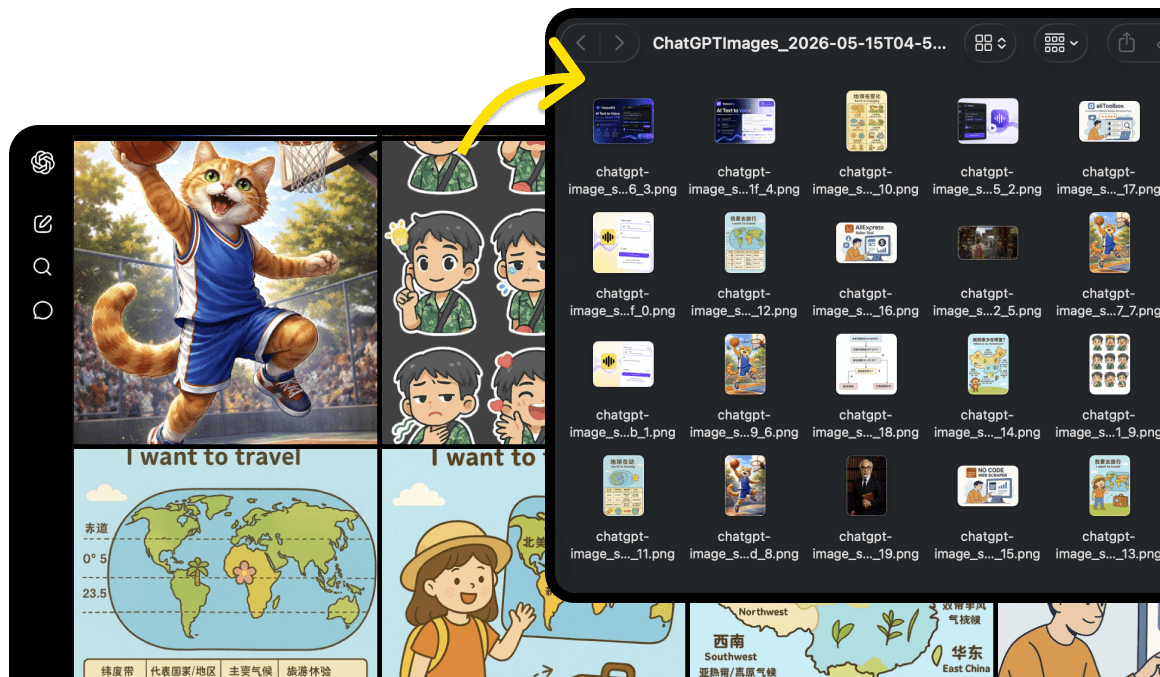
Built for how ChatGPT Images actually works
A fast-growing gallery, stable filenames, and metadata that ties back to conversations—your export flow should match that reality.
Download the whole gallery
Your ChatGPT Images page fills up fast. Instead of right-clicking each file, open the extension on chatgpt.com/images and work from one gallery view.
One folder, ready to browse
Exports land in an auto-named folder like ChatGPTImages_2026-05-15T04-5… with individual image files inside—no manual sorting.
Full-resolution files
Creators and marketers need real pixels. The extension targets the highest-resolution sources ChatGPT exposes for each image.
CSV metadata export
Researchers and builders need titles, conversation IDs, and URLs in columns—not only files. Export an 11-field CSV for labeling, QA, or pipelines.
Sidebar on the page you’re on
No third-party scraper or background job. The panel sits next to your ChatGPT Images gallery so counts and thumbnails match what you see.
Local-first by design
Downloads run in your browser session. This marketing site does not fetch your images; the extension does, under your account and control.
CSV export columns
When you need a machine-readable index alongside images, the CSV includes these fields for each entry.
- id
- title
- url
- width
- height
- conversation_id
- message_id
- asset_pointer
- kind
- generation_type
- created_at
Availability of each field follows what ChatGPT exposes on the Images page. Pricing describes what each plan includes.
How it works
From install to a local folder in three steps.
Install the extension
Add ChatGPT Image Downloader from the Chrome Web Store or follow the guided install.
Open ChatGPT Images
Go to chatgpt.com/images while signed in and let your gallery load.
Export from the panel
Choose Download all to save images into a folder, or Export CSV for structured metadata.
Simple pricing for bulk image exports from ChatGPT Images
Start free on chatgpt.com/images. Upgrade to Pro for unlimited folder downloads and full CSV metadata. Cancel anytime.
Free
Install the extension and try exports on your real ChatGPT Images gallery before you subscribe.
- Install and open the panel on chatgpt.com/images
- Preview detected images in the gallery
- Download up to 20 images per export
- CSV export up to 20 records
- Unlimited batch download to a folder is not included
- Full CSV export is not included
Pro
For creators, designers, and researchers who need every image in a local folder plus a complete metadata index.
- Unlimited batch download into a local folder
- Auto-named folders (e.g. ChatGPTImages with timestamp)
- Full CSV with id, title, url, dimensions, conversation_id, message_id, asset_pointer, kind, generation_type, and created_at
- Full-resolution sources where ChatGPT exposes them
- Priority support from the ExtensionsFox team
- Updates included while subscribed
Clear your ChatGPT Images backlog without saving one file at a time
Add ChatGPT Image Downloader and keep export work on the page where your gallery already lives.
Frequently asked questions
Which pages are supported?
Use the extension on the ChatGPT Images gallery at chatgpt.com/images. Coverage follows what ChatGPT exposes on the page; some CSV fields may be empty when ChatGPT does not provide them.
Where do I see what each plan includes?
See the Pricing section on this page for a clear comparison of Free and Pro capabilities.
Is ChatGPT Image Downloader affiliated with OpenAI or ChatGPT?
No. ChatGPT Image Downloader is published by ExtensionsFox and is not endorsed by or affiliated with OpenAI or ChatGPT. Trademarks belong to their respective owners.
What should I know about terms of use?
You are responsible for complying with OpenAI’s terms of use, applicable laws, and any agreements that govern your access to generated content. Use the extension only for scenarios you are authorized to copy or export.
Do you store the images I download?
This marketing site does not run exports for you. The extension operates in your browser. Refer to the Chrome Web Store listing and our Privacy Policy for how ExtensionsFox handles support or account-related data.
Who can I contact for help?
Email help@extensionsfox.com with questions about billing, installation, or troubleshooting.